Security & Credential Encryption
McpMux encrypts the credentials it stores with AES-256-GCM and keeps the encryption key in the OS keychain. Learn about McpMux's security model.
Security is a core design principle of McpMux. The credentials it stores — API keys, OAuth tokens, passwords, and secret server settings — are encrypted before they are written to its database.
The Problem with MCP Credentials Today
Without McpMux, MCP server credentials are stored in plaintext JSON configuration files:
{
  "mcpServers": {
    "github": {
      "env": {
        "GITHUB_TOKEN": "ghp_abc123_YOUR_REAL_TOKEN_HERE"
      }
    }
  }
}
These files sit in your home directory, readable by any process on your machine. If your machine is compromised, every MCP credential is immediately exposed.
How McpMux Protects Credentials
AES-256-GCM Encryption
Every credential stored by McpMux is encrypted using AES-256-GCM (Galois/Counter Mode), the authenticated encryption standard used by banks and governments. Each value is encrypted separately with its own random nonce, so the database never holds a credential in readable form.
OS Keychain Integration
Encryption keys are stored in the operating system's secure keychain:
| Platform | Keychain |
|---|---|
| Windows | DPAPI (Data Protection API) — the key file is encrypted for your Windows user account |
| macOS | Keychain — stored in your login keychain, unlocked with your login password |
| Linux | Secret Service (GNOME Keyring / KWallet) — unlocked with your login session |
Where no keychain is available (for example a headless Linux server without a Secret Service), McpMux keeps the key in a file in its data directory that only your user can read. Running a Secret Service provider such as gnome-keyring is more secure.
One Key per Installation
McpMux uses a single master key per installation (per data directory) for all stored credentials; there are no separate per-token or per-Space keys. Anyone who obtains both the database and that key can decrypt its contents, which is why the key lives in the OS keychain rather than next to the database.
Secure Deletion
When a credential is deleted, the database overwrites the space it occupied, and its write-ahead log is folded back into the database file, so the removed ciphertext doesn't linger on disk.
Memory Hygiene
Key material (the master key and the gateway's signing secret) is wiped from memory with the zeroize crate when it is no longer needed, and credentials are never printed in debug output. Decrypted credential values themselves are ordinary strings while in use.
Per-Space Credential Isolation
Credentials are scoped to individual Spaces. Your work GitHub token in the "Work" Space is completely separate from your personal GitHub token in the "Personal" Space: each is stored against its own Space and only used for that Space's connections.
This means:
- Switching Spaces switches credentials — no cross-contamination
- Deleting a Space removes all its credentials
- Different team members can use different credentials for the same service
Before vs After
| Without McpMux | With McpMux | |
|---|---|---|
| Storage | Plaintext JSON files | AES-256-GCM encrypted database |
| Key management | None — keys are in the file | OS keychain (DPAPI / Keychain / Secret Service), owner-only key file where none exists |
| Isolation | All credentials in one file | Per-Space credentials |
| Access control | Any process can read | Requires user session + keychain access |
| Token refresh | Manual | Automatic with encrypted storage |
| Memory | Tokens may linger | Key material zeroized after use |
| Audit | No visibility | Server logs and connection tracking |
OAuth Security
For servers using OAuth 2.1, McpMux implements the full security specification:
- PKCE (Proof Key for Code Exchange) — prevents authorization code interception
- Short-lived tokens — access tokens expire after approximately 1 hour
- Automatic refresh — tokens are refreshed transparently before expiry
- Encrypted storage — both access and refresh tokens are encrypted at rest
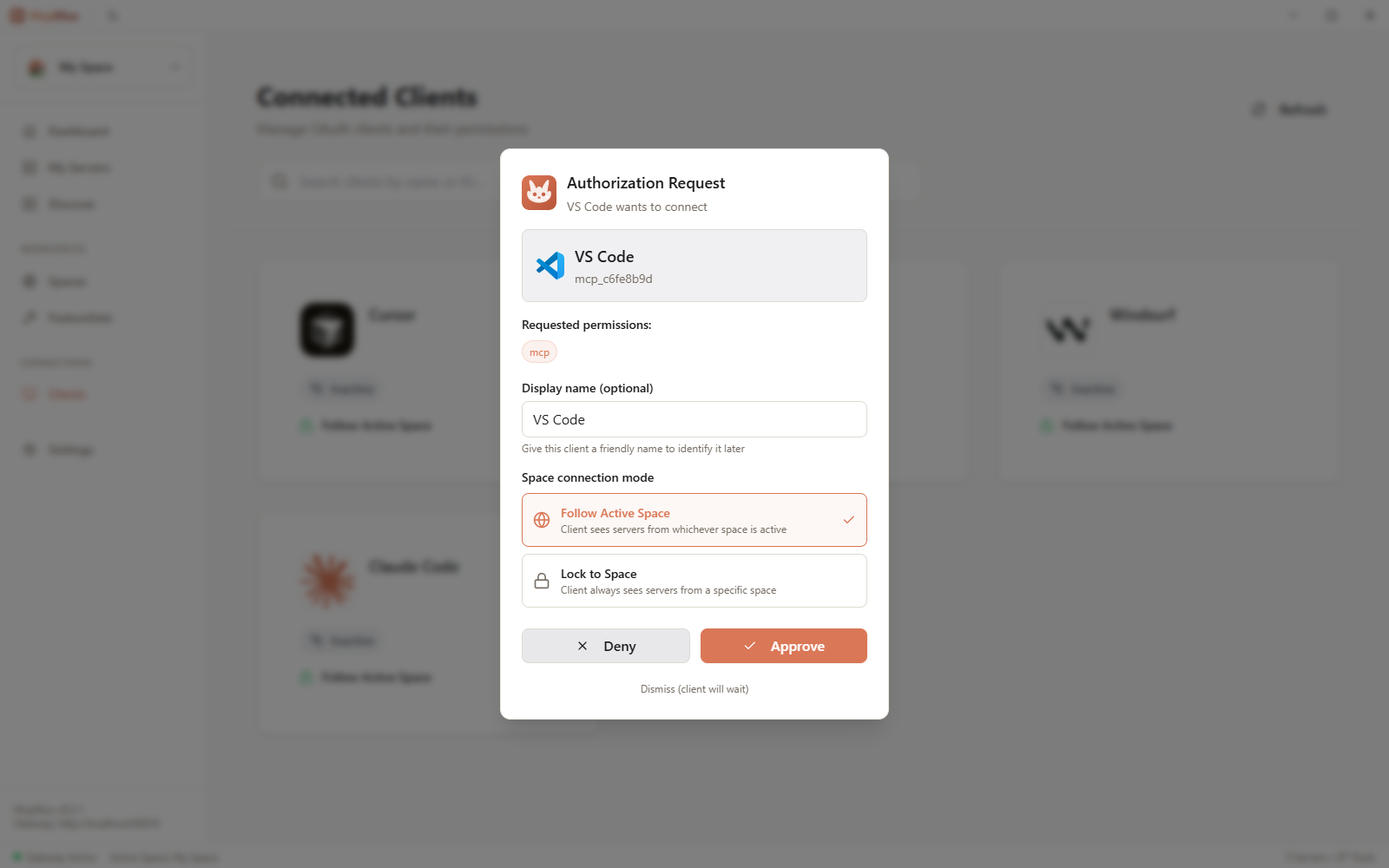
- Consent UI — OAuth authorization requests show a consent dialog in the desktop app, ensuring the user explicitly approves each connection
Deep Link Security
When McpMux receives an OAuth authorization request via deep link (mcpmux://authorize?request_id=xxx):
- Only the
request_idis passed in the URL — no client information or credentials - The consent token is shared only via local IPC, never over HTTP
- The desktop app validates the request server-side before showing the consent dialog
Next Steps
- Get started with McpMux to see encryption in action
- Learn about Spaces for credential isolation
- Configure Servers with encrypted credential storage
- Download McpMux to protect your MCP credentials today